Bee Observation (APCS 2024-01 Intermediate)

Points 100 1.0s 256M

Bob the bee is in an \(m \times n\) honeycomb. Every cell contains an uppercase or lowercase English letter.

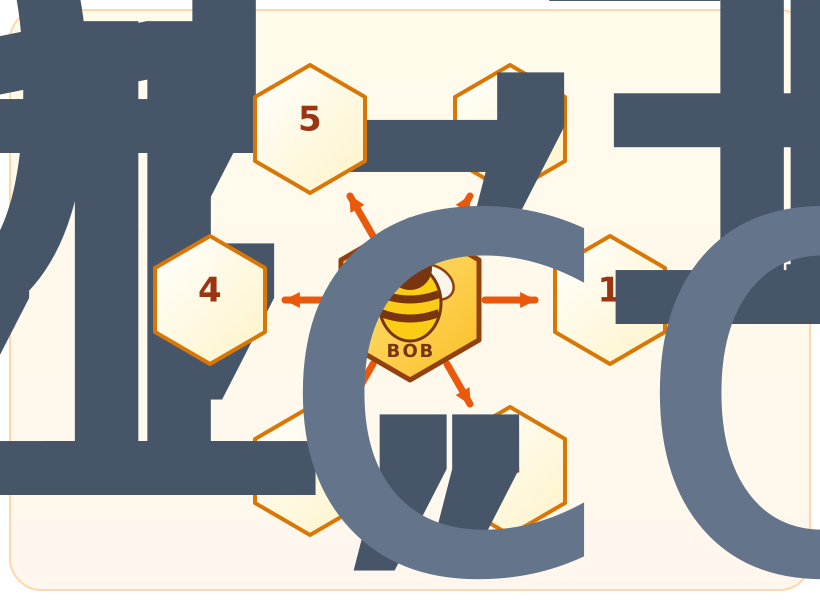
Bob starts at the bottom-left cell. With rows listed from top to bottom and columns from left to right in the input, the six movement directions are:

Bob in the center with directions 0 through 5 pointing upper-right, right, lower-right, lower-left, left, and upper-left
Direction Movement
\(0\) upper-right (previous row, same column)
\(1\) right (same row, next column)
\(2\) lower-right (next row, next column)
\(3\) lower-left (next row, same column)
\(4\) left (same row, previous column)
\(5\) upper-left (previous row, previous column)

Process the moves in order. If a move would take Bob outside the honeycomb, Bob stays in the same cell, but that step is still considered completed.

Output the string formed by the letter in Bob's cell after every step, followed by the number of distinct characters in that string. Uppercase and lowercase letters are considered different characters.

Input

The first line contains three integers \(m\), \(n\), and \(k\): the number of rows, the number of columns, and the number of moves.

The next \(m\) lines each contain a string of length \(n\), describing the rows of the honeycomb from top to bottom.

The last line contains \(k\) integers \(d_1,d_2,\ldots,d_k\), the movement directions in order.

Constraints

  • \(1 \le m,n \le 20\)
  • \(1 \le k \le 100\)
  • Every honeycomb character is an uppercase or lowercase English letter.
  • \(0 \le d_i \le 5\)

Output

Output two lines:

  • On the first line, output a string of length \(k\) containing the letter in Bob's cell after each step.
  • On the second line, output the number of distinct characters in the first-line string.

Scoring

There are two subtasks:

Subtask Points Additional constraint
1 60 \(m=2\)
2 40 No additional constraints

Sample Input 1

2 4 5
TyuI
ABaB
0 1 2 3 0

Sample Output 1

Tyaau
4

Sample Explanation 1

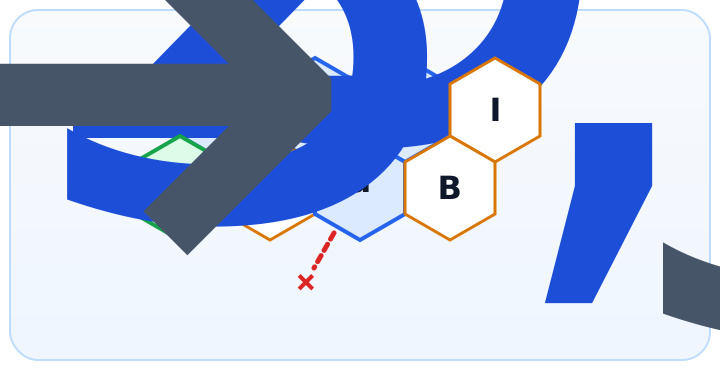
The honeycomb and path for sample 1; step 4 hits the lower wall, so Bob stays on the letter a

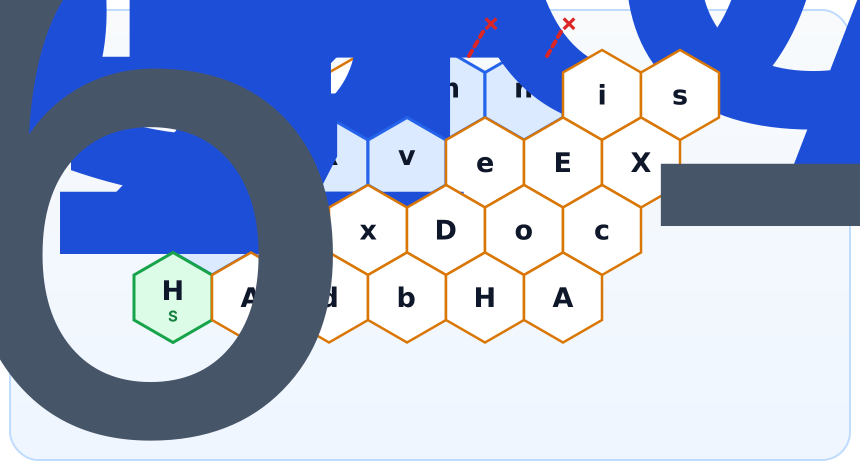
S marks the starting cell, and each number marks the cell occupied by Bob after that step. A × means that the move hits a wall and Bob stays in place.

Sample Input 2

4 6 11
rMmnis
LRveEX
ZexDoc
HAdbHA
0 1 5 1 1 0 3 0 0 1 0

Sample Output 2

ZeLRvmvmmnn
7

Sample Explanation 2

The honeycomb and path for sample 2; steps 9 and 11 hit the upper wall

On steps \(9\) and \(11\), Bob hits the upper wall and therefore stays on m and n, respectively.

Source

APCS Programming Practice, January 2024, Problem 2: ZeroJudge m932, "Bee Observation".

Problem page help

Keyboard shortcuts

Main features

  • Sample tests — Runs the sample cases bundled with the problem and auto-compares against the expected output.
  • Custom test — Run your code with your own stdin. Optionally tick the "Compare with expected (diff)" box to verify against expected output line-by-line.
  • Template — Paste the default code template you set on your profile page.
  • Collab — Edit this problem together with classmates in real time.
  • Auto-draft — Editor contents auto-save to your browser every 1.5 seconds (per account / problem / language).
  • Submit — Send your code to the judge for grading; returns AC / WA / TLE etc.

Limits

  • Source code: at most 65,536 characters
  • Custom test stdin and expected output: at most 1 MB each (≈1 million characters)
  • Custom test and sample test share the sandbox; about 1 request per 3 s per user (sample test: 1 per 1 s)
  • Custom test and sample test both have a 15 second wall-clock cap (the official judge still uses the problem time limit)
  • Interactive problems do not offer custom test (cannot simulate interaction with the judge).
  • Submitting has no rate limit, but rapid repeated submissions on the same problem are treated as score farming.