Route Arrangement (APCS 2021-11 Intermediate)

Points 100 1.0s 256M

You manage an amusement-park exhibition area represented by an \(m\times n\) grid. Rows are numbered from \(0\) to \(m-1\), and columns are numbered from \(0\) to \(n-1\). You may place posts in cells and arrange visitor routes using horizontal or vertical lines.

There are two types of operations:

  • r c 0: add a post at \((r,c)\). This cell is guaranteed not to contain a post, but one or two lines may pass through it. First remove every line passing through this cell, and then place the post. Separately search upward, downward, leftward, and rightward for the nearest post in that direction. If one exists, connect every cell between the new post and that post with a line.
  • r c 1: remove the post at \((r,c)\). This cell is guaranteed to contain a post. Also remove every line segment connected to this post in the four directions.

Removing a post does not automatically reconnect the posts on its two sides.

A horizontal line and a vertical line may cross in one cell. Removing one direction must preserve the other direction. A cell contributes one unit of area if it contains a post or at least one line; a crossing still counts as only one cell.

Initially, the exhibition area contains no posts or lines. Given \(h\) operations, determine:

  1. the maximum occupied area that appears at any time, and
  2. the occupied area after all operations.

Input

The first line contains three integers \(m,n,h\), the grid dimensions and the number of operations.

Each of the next \(h\) lines contains three integers \(r,c,t\), describing an operation of type \(t\) at \((r,c)\).

Constraints

  • \(1\le m,n\le100\)
  • \(1\le h\le200\)
  • \(0\le r<m\)
  • \(0\le c<n\)
  • \(t\in\{0,1\}\)
  • If \(t=0\), cell \((r,c)\) does not currently contain a post.
  • If \(t=1\), cell \((r,c)\) currently contains a post.
  • All input values are integers.

Output

Output two lines:

  • The first line contains the maximum occupied area seen during the operations.
  • The second line contains the occupied area after all operations.

Scoring

The two samples are judged in a zero-point batch. There are exactly \(20\) scored test groups, each worth \(5\) points:

  • Groups \(1\) through \(10\) (\(50\) points): \(m=1\).
  • Groups \(11\) through \(20\) (\(50\) points): no additional constraints.

Sample Input 1

3 5 6
0 0 0
0 2 0
2 2 0
2 0 0
2 4 0
2 2 1

Sample Output 1

10
6

Sample Explanation 1

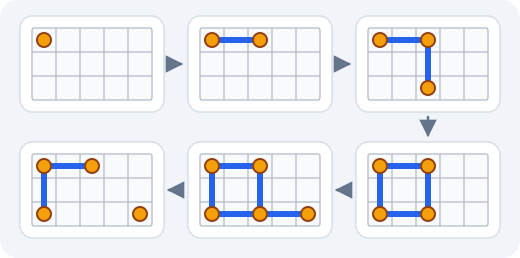
In the diagram below, orange circles are posts, blue segments are routes, and gray lines show the grid. Read the upper row from left to right, follow the arrow downward, and then read the lower row from right to left. The six panels correspond to the six operations.

The occupied areas after the operations are \(1,3,5,8,10,6\). The maximum is \(10\) after the fifth operation. When the post at \((2,2)\) is removed, its upward, leftward, and rightward segments are removed. The posts at \((2,0)\) and \((2,4)\) are not automatically reconnected, so the final area is \(6\).

Sample Input 2

5 5 7
2 2 0
2 4 0
4 4 0
4 0 0
0 3 0
4 3 0
4 3 1

Sample Output 2

12
7

Sample Explanation 2

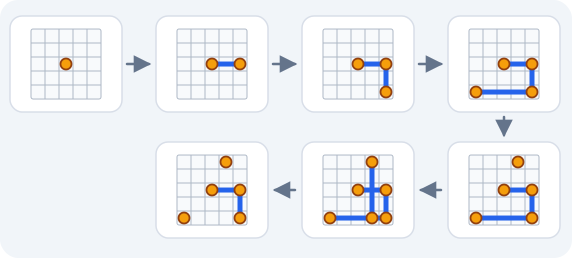
The next diagram uses the same symbols and reading order. Its seven panels correspond to the seven operations.

The occupied areas after the operations are \(1,3,5,9,10,12,7\). Operation six places a post on the existing horizontal line at \((4,3)\) and connects it upward to \((0,3)\). The new vertical line crosses the existing horizontal line at \((2,3)\), but that cell is counted only once, giving an area of \(12\).

When \((4,3)\) is removed, only lines connected to that post are removed. The horizontal line from \((2,2)\) to \((2,4)\) and the vertical line from \((2,4)\) to \((4,4)\) remain, so the final area is \(7\).

Source

APCS November 2021, Programming Problem 2. The rules and samples are based on ZeroJudge g596, "Route Arrangement" and Yi-Zhe Wang's tutorial. AACPOJ reorganized the statement and redrew the sample diagrams.

Problem page help

Keyboard shortcuts

Main features

  • Sample tests — Runs the sample cases bundled with the problem and auto-compares against the expected output.
  • Custom test — Run your code with your own stdin. Optionally tick the "Compare with expected (diff)" box to verify against expected output line-by-line.
  • Template — Paste the default code template you set on your profile page.
  • Collab — Edit this problem together with classmates in real time.
  • Auto-draft — Editor contents auto-save to your browser every 1.5 seconds (per account / problem / language).
  • Submit — Send your code to the judge for grading; returns AC / WA / TLE etc.

Limits

  • Source code: at most 65,536 characters
  • Custom test stdin and expected output: at most 1 MB each (≈1 million characters)
  • Custom test and sample test share the sandbox; about 1 request per 3 s per user (sample test: 1 per 1 s)
  • Custom test and sample test both have a 15 second wall-clock cap (the official judge still uses the problem time limit)
  • Interactive problems do not offer custom test (cannot simulate interaction with the judge).
  • Submitting has no rate limit, but rapid repeated submissions on the same problem are treated as score farming.